
I tested ToMusic from a content creator’s point of view, not from the perspective of a professional music producer. That distinction matters. A creator often needs music that fits a video, a product clip, a podcast intro, a short film idea, or a social post, but they may not have time to compose, license, edit, and revise audio manually. In that situation, an AI Music Generator is useful only if it can turn a practical content need into a track quickly enough to keep the project moving.
The problem with content music is not simply finding “good music.” The harder part is finding music that belongs to the piece. A track can sound impressive and still be wrong for the scene. It may be too energetic, too emotional, too distracting, too generic, or too polished. That is why I tested ToMusic by thinking in scenes rather than abstract genres. I wanted to know whether it could help translate content context into usable audio direction.
The result felt more practical than glamorous. ToMusic did not make every track perfect on the first try, and I would not pretend otherwise. But it did help shorten the distance between a content idea and a listenable soundtrack draft. For creators working under time pressure, that shorter distance can matter a lot.
Why Content Creators Need Different Music Tools
A songwriter may focus on melody, lyrics, and emotional storytelling. A producer may focus on arrangement and sonic detail. A content creator often has a different priority: fit. The music needs to support the content without taking over.
The Track Must Serve The Main Message
For a product video, the music should support confidence or clarity. For a travel montage, it may need motion and openness. For a tutorial, it should not distract from speech. For a personal story, it should create emotional space.
This became obvious during testing. Some generated tracks were pleasant by themselves but not right for the imagined content. That distinction is important. The value of ToMusic depends on how well the user can describe not only the sound, but the role the sound should play.
Speed Matters When Deadlines Are Real
Content work often happens quickly. A creator may need to publish the same day. A small business may need audio for a campaign draft. A podcaster may need an intro concept. Searching stock libraries can take longer than expected.
ToMusic was helpful because it made soundtrack drafting feel immediate. I could describe a scene, generate a track, listen, then adjust the direction. That made the audio part of the project feel less like a separate production burden.
How I Tested ToMusic With Content Scenarios
Instead of testing only random genres, I created realistic content scenarios. Each scenario had a purpose, mood, and listening role.
The First Scenario Was A Product Video
I imagined a short product video for a clean desk setup. The music needed to feel modern, calm, and confident without becoming too dramatic. My first prompt was too simple and produced a track that felt broadly pleasant but not specific.
When I added details about the video’s purpose, pacing, and desired restraint, the output felt closer. It had a cleaner mood and less unnecessary drama. This taught me that content prompts should include visual context.
The Second Scenario Was A Travel Montage
For the travel test, I wanted something warm and forward-moving, but not overly cheerful. The first result leaned too bright. After revising the prompt with words like reflective, open-road, soft percussion, and gentle lift, the track felt more usable.
This was a useful lesson. If I asked for uplifting music, the output could become too cheerful. If I asked for reflective music, it could become too slow. The best prompt described the balance between the two.
The Third Scenario Was A Podcast Intro
A podcast intro has a different requirement. It needs identity, but it should not overpower speech. I tested a prompt for a warm, intelligent, low-key intro with light rhythm and no aggressive lead melody.
The result improved when I explicitly asked for restraint. For content creators, restraint is often just as important as excitement. A soundtrack should leave space for voice, message, and editing rhythm.
The Official Workflow Felt Creator-Friendly
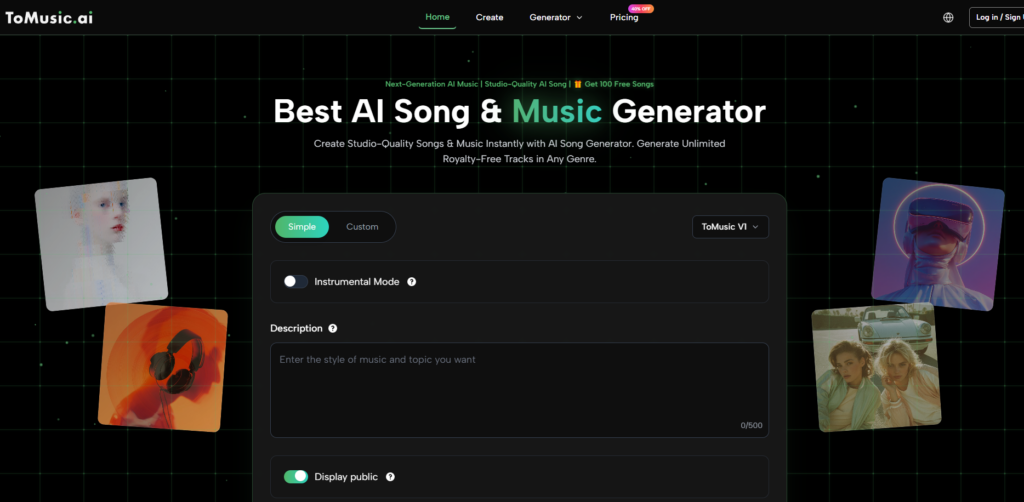
The public ToMusic process is simple enough for creator testing. It does not require a complicated studio setup before hearing results.
The Four Steps Support Fast Project Testing
This workflow works well for creators because it keeps the focus on the project. You can start with the video’s purpose, not music theory. You can test a draft quickly, then decide whether the direction is worth keeping.
Generation is only part of the process. Review is where the real decision happens. Does the track support the scene? Does it distract? Does it fit the pacing? Does it feel believable for the audience?
Prompting ToMusic Like A Creative Brief
The biggest improvement in my test came when I stopped prompting like a music fan and started prompting like a creative director.
A Weak Prompt Names Only A Genre
A prompt like “make a chill electronic song” may produce something usable, but it gives little context. Chill electronic music can fit a lounge, a tech ad, a study video, or a night drive. Those are different needs.
A stronger prompt says what the music is for. For example, “minimal electronic background music for a clean product video, calm and modern, with soft rhythm and no distracting vocal lead.” That gives ToMusic a clearer job.
Scene Language Helped More Than Expected
During testing, scene descriptions improved the results. Words like morning routine, city walk, quiet desk setup, product reveal, tutorial intro, or emotional montage helped define the listening context.
For content creators, the music is usually attached to a visual or spoken piece. Describing that piece helps the generated track feel more relevant.
Where Text-Based Soundtrack Creation Helps
Text-based music generation is especially useful for creators because they often think in content goals rather than musical terms. They may not know the exact genre, but they know the feeling they need.
Written Prompts Replace Library Searching
The value of Text to Music is that the user can describe the soundtrack directly instead of searching through hundreds of tracks. This does not guarantee a perfect result, but it changes the starting point.
In a stock music library, you search and react. In ToMusic, you direct and listen. That difference can make the process feel more active and less random.
The User Learns Through Listening
Each generated track teaches the creator something. If the music feels too busy, the next prompt can ask for more restraint. If it feels too soft, the prompt can add rhythm. If it feels too generic, the prompt can include a clearer use case.
The more I tested, the more I realized that prompt writing is not just input. It is part of the creative workflow. Better prompts create better options.
Testing Results Across Content Types
The table below summarizes how ToMusic felt in different creator scenarios.
|
Content Scenario |
Desired Music Role |
What Worked Well |
What Needed Adjustment |
|
Product video |
Calm, modern confidence |
Clear scene prompts helped |
Avoiding excess drama |
|
Travel montage |
Warm motion and openness |
Emotional contrast worked |
Balancing uplift and reflection |
|
Podcast intro |
Identity without distraction |
Restraint prompts helped |
Preventing melodies from dominating |
|
Tutorial video |
Supportive background |
Simple instrumental direction worked |
Keeping the track low-pressure |
|
Social short |
Fast emotional hook |
Genre and tempo helped |
Avoiding overproduced energy |
|
Personal story |
Soft emotional support |
Vocal tone descriptions helped |
Preventing sentimentality |
The Best Results Came From Purposeful Prompts
Across scenarios, the strongest results came when I described the purpose of the track. Genre helped, but purpose mattered more. A soundtrack is not only a style. It is a function inside a larger piece of content.
ToMusic seemed most useful when I gave it a focused creative role. That does not mean the result always matched perfectly, but it made the review process more productive.
What Felt Real During The Test
The honest value of ToMusic was not that it removed all creative effort. It changed where the effort happened. Instead of spending time searching for music, I spent time defining what the content needed.
The Tool Made Me Clarify The Project
To write a useful prompt, I had to understand the video more clearly. Was the tone warm or polished? Was the rhythm fast or calm? Should the music be noticed or felt in the background?
This was unexpected. Testing ToMusic did not only help with audio. It made me think more clearly about the content itself. Music became a way to define the project’s emotional direction.
Some Tracks Were Useful Even If Imperfect
A few generated tracks were not final, but they were useful references. They helped me decide whether the content needed a softer rhythm, a warmer sound, or a more minimal arrangement.
Even if a creator later changes the music, a generated draft can help communicate direction to a team, client, editor, or collaborator. That makes the tool useful beyond the final output.
Limitations Content Creators Should Expect
ToMusic is helpful, but it is not a guarantee that the first track will fit perfectly. Content music is context-sensitive, and AI does not see the actual video unless the user describes it well.
Vague Content Prompts Produce Vague Tracks
If the prompt only says “background music for video,” the output may be too general. The user should include pacing, mood, audience, and whether the music should be subtle or attention-grabbing.
Because the platform depends on text input, the user needs to translate visual context into words. This can take practice, but it is worth doing.
Some Outputs May Compete With Content
A track can be musically interesting but still too busy for a tutorial or voiceover. A vocal track may distract from spoken content. A strong melody may pull attention away from the message.
The best way to evaluate a track is not in isolation. It should be tested against the actual or imagined content. That is where fit becomes clear.
How I Would Use ToMusic Again
After testing, I would use ToMusic in three main ways as a content creator.
First, I Would Draft Soundtrack Directions
Before searching elsewhere, I would generate a few possible directions. This would help me decide whether the project needs something calm, cinematic, playful, intimate, or energetic.
Music often changes how an edit feels. Having a draft track early can influence pacing, transitions, and emotional flow.
Second, I Would Test Brand And Mood Variations
For small brands, I would test several tonal directions. A product could feel premium, friendly, futuristic, warm, or minimalist depending on the soundtrack.
Hearing several versions makes brand mood easier to discuss. It turns abstract adjectives into audio examples.
Third, I Would Save Strong Drafts For Later
Not every generated track fits the current project. Some may become useful later. Saving strong outputs creates a small personal library of ideas.
A track that misses one video may fit another. That is why storage and track management matter in practical use.
My Honest Verdict For Creators
ToMusic feels useful for content creators because it helps turn content needs into music drafts quickly. It is strongest when the user describes the project clearly and listens critically afterward. It is weaker when the user expects the platform to guess the entire context from a vague phrase.
It Works Best As A Soundtrack Sketchpad
I would not describe it as a replacement for every music workflow. For high-end campaigns, final audio decisions may still need deeper production judgment. But for drafting, testing, and fast content creation, it offers real value.
The most important thing ToMusic gave me was not instant perfection. It gave me faster fit discovery. I could hear whether a mood worked, whether a scene needed more energy, and whether a content idea had the right emotional support.
Why This Test Felt Genuinely Useful
ToMusic worked because it respected the way content creators actually think. They often start with a scene, a feeling, a deadline, and a need for something that fits. The platform gives those users a way to begin without pretending they are professional composers.
The test felt honest because some outputs missed, some came close, and a few made the imagined content feel more complete. That is how real creative tools often work. They do not remove judgment. They make judgment easier to apply.
The Platform Helps Creators Hear Direction Sooner
For creators who need fast, flexible, and context-aware music drafts, ToMusic is worth testing. It can help turn a silent idea into something you can evaluate.
In the end, the most convincing part was not hype. It was practicality. ToMusic helped me move from “I need music for this” to “now I know what kind of music this needs.” For content creation, that is a meaningful step.